What Is PAYE on Payslip? Tax Code calculation, Deductions and Take-Home Pay
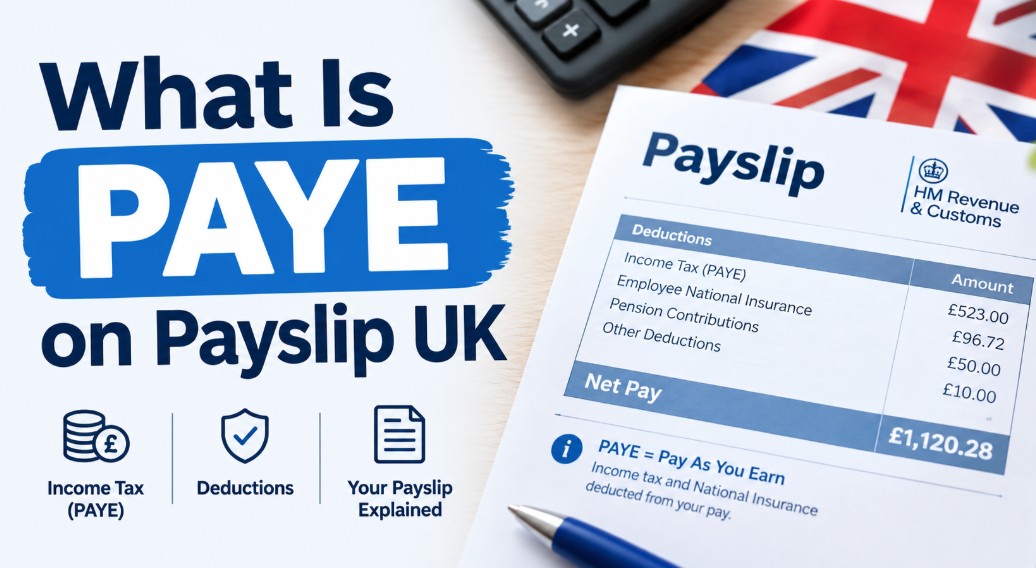
PAYE on a payslip is the Income Tax deduction collected under HM Revenue and Customs’ (HMRC) Pay As You Earn system, taken directly from wages before an employee is paid. The amount is calculated each payday from the employee’s tax code automatically, using 2026/27 tax year rates.
Key Takeaway
- PAYE stands for Pay As You Earn, HMRC’s system for collecting Income Tax and National Insurance from wages before payment.
- The 2026/27 Personal Allowance is £12,570 at 0% tax, with the basic rate of 20% applying up to £50,270.
- Employers, not HMRC, are responsible for deducting PAYE correctly and reporting it via Real Time Information.
What is PAYE on payslip?
PAYE on a payslip shows how much Income Tax HMRC has collected from that pay period’s wages. PAYE is not a tax itself, it is the system used to collect one.
HMRC introduced the system in 1944 to spread Income Tax collection across the year, rather than one annual bill. Each payday, the employer calculates the tax owed using that employee’s tax code and sends it to HMRC before wages reach the bank account.
PAYE also collects National Insurance, though it appears as a separate line. Income Tax funds public spending; National Insurance funds the State Pension and NHS.
Most employees never need a tax return because of this, since the system adjusts automatically for pay rises, bonuses, or a tax code change through the year. PAYE isn’t limited to salaries either: workplace and private pension income is taxed the same way, though the State Pension itself is paid without tax removed at source.
Where do you find PAYE on a payslip?
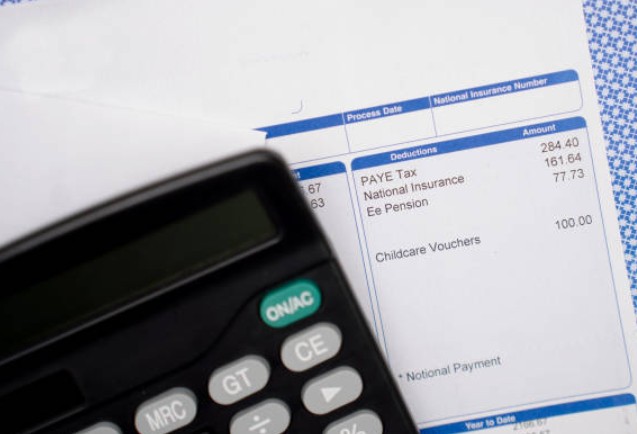
The PAYE deduction and reference number both appear on a standard payslip, usually near the tax code and National Insurance line. Three checks confirm exactly where.
- Look under Deductions or Tax for a line labelled PAYE or Income Tax, showing the amount removed this pay period.
- Check near the National Insurance number for the employee’s PAYE reference, a unique identifier tied to that employment.
- Look at the payslip header or footer for the employer’s separate PAYE reference, which HMRC uses to identify the business.
If any of these are missing, HR or payroll should be able to confirm them directly. Digital payslips sometimes lay this information out differently to paper ones, so the exact position can vary between employers even though the same details are legally required either way.
Employers must provide a payslip on or before payday, whether printed or issued electronically.
What other deductions appear alongside PAYE?
PAYE rarely appears alone, as most payslips show several statutory and voluntary deductions alongside it.
- National Insurance: shown separately from PAYE, funding the State Pension and NHS.
- Workplace pension contributions: automatic for most employees under auto-enrolment rules overseen by The Pensions Regulator, once earnings pass the qualifying threshold.
- Student loan repayments: deducted once income passes the relevant plan’s threshold, with the percentage varying by plan type.
- Child maintenance deductions: calculated as a percentage of gross weekly income when ordered through the Department for Work and Pensions’ Child Maintenance Service, rising with the number of children involved.
- Other voluntary deductions: union fees, charitable giving through Payroll Giving, or salary sacrifice arrangements.
A payslip listing several of these at once isn’t a sign of an error. Each is calculated independently, then combined into the final net figure, explaining why gross and net pay can differ substantially even when PAYE itself looks unremarkable.
How does PAYE calculation work on a payslip?
PAYE is calculated by applying HMRC’s Income Tax bands to earnings above the employee’s tax-free Personal Allowance, as set out by HM Treasury each tax year.
Every employee has a tax code, most commonly 1257L, which tells payroll software how much can be earned before tax applies. The numbers in a tax code represent the Personal Allowance divided by ten, so 1257 signals £12,570; the letter L confirms the standard allowance applies in full. Codes ending in W1 or M1 mark an emergency tax code, used when HMRC lacks full details of a new starter’s previous pay.
National Insurance is calculated separately but deducted at the same time. For 2026/27, employees pay 8% on earnings between the £12,570 Primary Threshold and the £50,270 Upper Earnings Limit, and 2% above that.
| Band | Taxable income (2026/27) | Rate |
|---|---|---|
| Personal Allowance | Up to £12,570 | 0% |
| Basic rate | £12,571 to £50,270 | 20% |
| Higher rate | £50,271 to £125,140 | 40% |
| Additional rate | Over £125,140 | 45% |
Note: these bands apply to England, Wales and Northern Ireland. Scotland sets its own Income Tax bands and rates separately.
The 2026/27 Personal Allowance has stayed at £12,570 since 2021/22, frozen by successive Budgets rather than raised each year. This freeze means more income becomes taxable as wages rise over time, a pattern economists often call fiscal drag, even without any explicit tax rise being announced.
Only income above each threshold is taxed at that band’s rate, earning £51,000 doesn’t mean the whole amount is taxed at 40%.

How does PAYE affect take-home pay?
PAYE reduces gross pay to net pay by removing Income Tax at source, which is why employees see tax already deducted before any money reaches their account.
Take-home pay depends on the tax code, National Insurance, and any other deductions running alongside PAYE.
According to the Office for National Statistics, average weekly earnings across Great Britain stood at roughly £749 in mid-2026, meaning most employees sit within the basic-rate band once National Insurance is also applied.
A pay rise, bonus, or second job can shift an employee into a higher band partway through the year, which is why take-home pay sometimes moves unevenly even without dramatic income changes.
For instance, individuals scaling their earnings to analyze a £100k after-tax UK threshold will notice how climbing into higher brackets heavily reshapes their final net salary.
A second job usually carries its own tax code with no further Personal Allowance attached, since the full £12,570 allowance is normally set against the main job’s earnings.
Who is responsible for PAYE?
Employers, not HMRC, are legally responsible for operating PAYE correctly. A business must register with HMRC before paying anyone above the Lower Earnings Limit, currently £129 a week, and then keep four duties running:
- Obtaining a PAYE reference before the first payday.
- Deducting the correct Income Tax and National Insurance using each employee’s tax code.
- Reporting pay and deductions via Real Time Information on or before payday.
- Paying HMRC the total owed by the monthly or quarterly deadline.
HMRC’s role is to set the rates and check submitted data, not run payroll itself. Getting this wrong risks penalties or disputes with staff.
Employers can offset some cost through the £10,500 Employment Allowance, though single-director companies are usually excluded, and must keep Companies House records accurate since mismatches complicate PAYE reporting later.
When is PAYE deducted and paid to HMRC?
PAYE is deducted every time an employee is paid and reported to HMRC on or before that same payday.
- Payroll calculates each deduction and generates the payslip on or before payday.
- A Full Payment Submission (RTI) reports pay and deductions to HMRC that same day.
- The employer pays HMRC the total owed, usually monthly, by the 22nd of the following month.
- Small employers whose total PAYE liability is below £1,500 a month can arrange to pay quarterly instead, reducing the administrative burden.
Missing an RTI deadline or late payment can trigger an automatic HMRC penalty, even if the underlying calculation was correct.
HMRC’s penalty regime scales with company size and the number of late submissions, so a single missed deadline rarely causes serious damage on its own.
At the end of each tax year, HMRC and the employer reconcile every payment made, which is when most refunds or underpayments come to light.

Conclusion
PAYE on a payslip is simply Income Tax collected automatically through HMRC’s system, with National Insurance and other deductions sitting alongside it.
Understanding the tax code, how PAYE is calculated, and the employer obligations behind that single line makes it far easier to check any payslip with confidence, and to spot quickly when something on it genuinely needs querying.
Disclaimer: Employees can also view and update their tax code directly through the official GOV.UK Personal Tax Account or HMRC app. Tax rates and thresholds reflect the 2026/27 tax year and may change in future Budgets. Individual circumstances vary, so anyone unsure about their own PAYE deductions should confirm details directly with HMRC or a qualified adviser.
FAQs
What is PAYE tax in the UK?
PAYE is not a separate tax; it’s the system HMRC uses to collect Income Tax and National Insurance from wages. Seeing PAYE on a payslip means the employer has already deducted and paid this amount to HMRC on the employee’s behalf.
Should you be paying PAYE and NI?
Yes, if employed and earning above the relevant thresholds. Both are deducted automatically through PAYE alongside each other, so no separate action or paperwork is usually needed from the employee. Anyone who wants to check the tax on a payslip can do so directly through HMRC’s own guidance.
Do you get PAYE tax back?
Yes, if too much was deducted during the tax year. HMRC reconciles PAYE annually and issues a refund automatically, or after a query is raised through a personal tax account.
Why is PAYE so high?
An incorrect tax code is the most common cause of unexpectedly high PAYE. Comparing the code shown on a payslip against HMRC’s online service quickly confirms whether it matches current circumstances.