
What Does YTD Mean on a Payslip? UK Payroll Calculations, Tax Rules and Fixing Errors
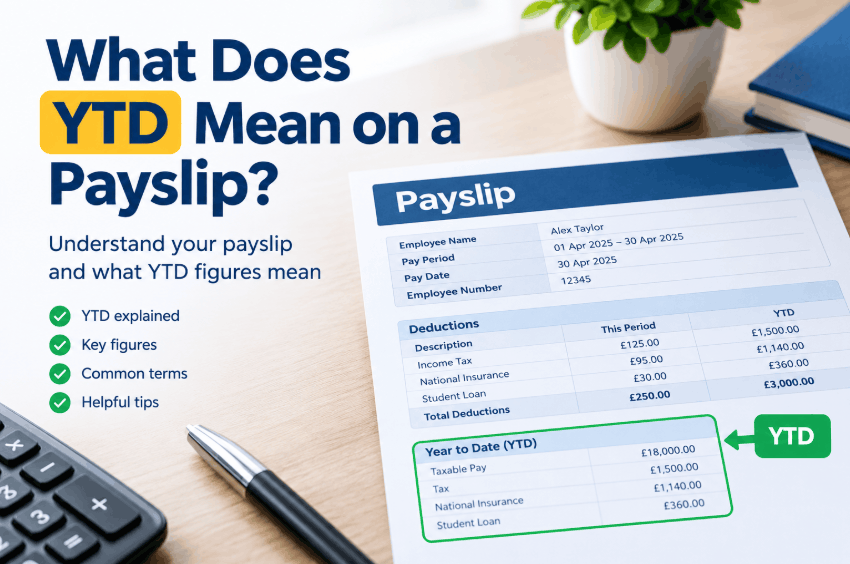
What does YTD mean on a payslip? YTD, short for year to date, is a running total of an employee’s pay, tax, National Insurance and pension figures, starting at zero on 6 April and updating every payday, as of the 2026 to 2027 tax year.
Key takeaways
- YTD resets to zero on 6 April, the start of the UK tax year, not on 1 January.
- UK law does not require YTD totals on payslips, although GOV.UK confirms they can be included.
- A director’s National Insurance follows annual earnings, so a director’s National Insurance YTD behaves differently from an employee’s.
What Does YTD Mean on a Payslip? The Figures It Covers
Every figure on a payslip appears twice: once for the current pay period and once as a YTD total. The YTD total is the cumulative total of every pay period since the tax year began.
HM Revenue and Customs (HMRC) runs the UK tax year from 6 April to 5 April. A YTD column therefore resets on 6 April, not on 1 January.
| YTD figure | What it adds up | Where it sits in the pay calculation |
|---|---|---|
| Gross pay | All pay before any deduction, including overtime, bonuses and statutory payments | Before all deductions |
| Taxable pay | The part of pay that counts for income tax | Before tax is applied |
| Tax paid | Income tax taken through Pay As You Earn (PAYE) | A deduction |
| National Insurance | Employee National Insurance taken so far | A deduction |
| NIable pay | Pay that counts for National Insurance; some payslips label it NICable pay | Before National Insurance is applied |
| Pension | The employee’s own workplace pension contributions | A deduction |
| Student loan | Repayments taken once earnings pass the plan threshold | A deduction |
| Net pay | Take-home pay after every deduction | After all deductions |
Taxable pay YTD is the part of gross pay that counts for income tax, so it can sit below gross pay YTD. Salary sacrifice and non-taxable expenses lower it, and benefits in kind reported on form P11D generally stay outside it, while payrolled benefits go through payroll and count in it.
While these figures define the standard components of pay, statutory rules dictate which elements must appear on a payslip.
Is YTD Compulsory on a UK Payslip?
No. UK law does not require a payslip to show YTD totals. Section 8 of the Employment Rights Act 1996 gives a worker a written itemised payslip at or before payday, and the statutory minimum payslip content is:
- The gross amount of pay
- Each variable deduction, such as tax and National Insurance, with its purpose, plus fixed deductions unless a separate written statement covers them
- The net amount of pay
- The amount and method of each part-payment, where pay is split between methods
- The total hours worked, where pay varies with time worked
YTD totals are optional. GOV.UK’s employer guidance lists the required items, then says payslips can also include the total pay and deductions so far in the tax year. Some payroll guides state that every UK payslip carries YTD, but the statute and GOV.UK treat it as an optional extra.
The right to an itemised payslip applies to employees and workers, but statutory exclusions apply:
- Independent contractors and freelancers
- Members of the police service
- Merchant seamen
- Crew members paid purely by a share of a fishing vessel’s profits
If you show YTD, keep it accurate. Check that the totals match your payroll records, because wrong figures can disturb tax deductions and statutory payments and prompt queries. Next, check how each figure is built.

How to Calculate YTD on a Payslip
To calculate YTD on a payslip, add each pay period’s figure to the previous YTD total, one field at a time.
- Start from the first payslip after 6 April, or from the brought-forward figures for a new starter.
- Pick one field, such as gross pay, and stay with it: reconcile gross with gross and taxable with taxable.
- Add the current period’s figure to the previous YTD figure.
- Repeat on every payday, and include any correction made in a later pay run.
Current period versus year to date is a difference of span: current covers one pay period, YTD covers the tax year so far. YTD is a sum of the underlying period amounts, so the latest amount multiplied by the number of payslips will not match it when pay changes.
The illustration below uses hypothetical round numbers, not a real payslip: £2,500 a month, with £500 of overtime in June.
| Payslip month | Current gross pay | YTD gross pay |
|---|---|---|
| April | £2,500 | £2,500 |
| May | £2,500 | £5,000 |
| June | £3,000 | £8,000 |
Tax works differently, because its YTD figure feeds the calculation itself.
How YTD Tax and YTD National Insurance Are Worked Out
Income tax runs on a cumulative basis, so the tax YTD figure feeds each payday’s calculation, while National Insurance is assessed on each pay period alone.
On a cumulative tax code, payroll software recalculates tax on all taxable pay so far in the tax year and deducts only the amount not yet paid. PAYE YTD figures are therefore working inputs, not just a record.
The next illustration continues the hypothetical £8,000 gross at the end of June, on tax code 1257L, using HMRC’s published rates and thresholds for employers:
- Tax-free pay to date: 3 × £1,048 = £3,144
- Taxable pay to date: £8,000 − £3,144 = £4,856
- Tax YTD at the 20% basic rate: about £971
- Caveat: these are England, Wales and Northern Ireland rates, payroll software uses HMRC’s published tables, so pennies can differ, and Scottish taxpayers have different rates
National Insurance works on a different clock. For 2026 to 2027, the monthly primary threshold is £1,048 and the monthly upper earnings limit is £4,189, and category A employees pay 8% between them and 2% above.
On a hypothetical £3,000 month, that is 8% of £1,952, or £156.16. Student loan deductions on a payslip also maintain a cumulative YTD total that resets on 6 April.
While the repayment itself is calculated on each pay period’s earnings above the relevant plan threshold, the YTD total provides a running record of deductions passed to HMRC before the annual transfer to the Student Loans Company (SLC).
What Happens to YTD When Someone Joins Mid-Year
A new starter’s YTD depends on what the new employer receives: a P45 carries pay and tax to date, and without one the employer relies on a starter checklist.
| Situation | What the employer holds | How tax is worked out |
|---|---|---|
| Starter with a P45 | Total pay and tax paid to date for the current tax year | On total income so far in the tax year |
| Starter without a P45 | The starter checklist | Tax code and starter declaration set from the checklist |
| Previous income and tax details missing | Neither document | Emergency tax code, usually temporary |
An emergency tax code works on the Week 1/Month 1 basis: earlier pay is ignored, and tax is worked out on that week’s or month’s pay only, as if the same amount were paid every period. GOV.UK says the code is usually temporary, and HMRC can take up to 35 days from the start date to update it.
Because YTD is optional, no rule fixes whether a payslip’s PAYE YTD figures include pay carried over from a previous employer. Payroll software decides, so one employer may show brought-forward figures separately and another may combine them.
Other events also move a YTD total during the year:
- Tax code updates from HMRC
- Backdated pay adjustments
- Corrections to earlier pay periods
- Recalculated statutory payments
A change of payroll software mid-year needs opening balances. Load each employee’s pay, tax and deductions to date, or YTD will restart from zero on the first payslip from the new system. Directors raise a separate question about National Insurance.

Why a Director’s National Insurance YTD Works Differently
A company director’s National Insurance is worked out from annual earnings rather than each pay period, so the National Insurance YTD on a director’s payslip does not follow an employee’s pattern.
Employer’s National Insurance also applies to a director’s salary, even when the director is the only employee of their own company. GOV.UK describes two methods for running the calculation:
- Standard annual earnings period method: Each payday, National Insurance is worked out on total pay over the tax year so far, including bonuses, and the National Insurance already paid is taken off. GOV.UK says this method is common for directors paid irregularly.
- Alternative method: Each payday, National Insurance is worked out only on that period’s pay, and any extra due is deducted from the last payment of the tax year. GOV.UK says this method is common for directors paid regularly.
Under the standard method, a check against monthly thresholds will not match, because the calculation looks at the whole year to date. That mismatch is not an error, and it is one of four misreadings that recur in payroll queries.
If you run payroll for a director, including yourself, set the director’s calculation method in your payroll software. Report the method on each Full Payment Submission, using AN for the standard method or AL for the alternative.
YTD Misreadings That Cause Payroll Queries
Four misreadings recur, and each has a documented answer in this guide.
| Misreading | Correction |
|---|---|
| Every UK payslip must show YTD | YTD totals are optional under the statutory payslip rules |
| YTD starts on 1 January | UK YTD figures reset on 6 April |
| YTD gross pay equals YTD taxable pay | Taxable pay can be lower, because salary sacrifice and non-taxable payments reduce it |
| National Insurance YTD is recalculated like tax YTD | Employee National Insurance is assessed on each pay period alone, while directors use annual earnings |
When a worker still questions a figure, a fixed checking routine gives a quicker answer.
What to Do When an Employee Questions Their YTD
When a worker questions a YTD figure, ask for the payslip date and the exact field first, because a general complaint gives you nothing to trace. Then work through the check in a fixed order:
- Confirm the payslip date and the field in question: gross pay, taxable pay, tax, National Insurance, pension or net pay.
- Check the reset date: YTD should restart from zero on 6 April, not on 1 January.
- Rebuild the figure from the payslips since 6 April, adding like with like.
- Check amounts brought forward: P45 figures for a starter, or opening balances after a change of payroll software.
- Compare the result with the pay and deductions reported to HMRC through Real Time Information (RTI), and send a corrected Full Payment Submission as soon as possible if an error shows.
Keep a note of what changed, so the next employee payslip query can be answered from the same notes. Check the same totals again at the payroll year-end, when they feed the P60.
How YTD Feeds the P60 and the Employer’s Payroll Totals
At the payroll year-end, the final payslip’s YTD figures should agree with the figures on the P60. GOV.UK says an employer must give a P60 to anyone working for them on 5 April, by 31 May, on paper or electronically. A mismatch can point to a payroll error or an unprocessed correction.
A year-end reconciliation normally covers four checks:
- Gross pay, tax and National Insurance YTD on the last payslip against the P60
- Brought-forward P45 figures for anyone who started mid-year
- Opening balances, if the payroll software changed
- Corrections sent after the final payday of the tax year
A second YTD exists at business level. The employer’s own YTD payroll total adds up pay for every employee across the tax year, and a business can add employer’s National Insurance when tracking total cost. No single payslip prints that figure.

Conclusion
YTD on a payslip serves as a cumulative running total from 6 April, operating as an optional inclusion under UK employment law. For employers, accuracy decides its value: totals that match payroll records, P45 figures and the P60 prevent avoidable queries.
Directors and emergency tax codes are the two cases where the usual checks need adjusting.
FAQs
What does YTD mean on a payslip, and what is its full form?
YTD stands for year to date. It is the running total of a payslip figure from 6 April to the latest payday.
Is it compulsory to show YTD on a payslip?
No. UK law does not require YTD totals, although GOV.UK says payslips can include them.
Is YTD before or after tax?
It depends on the figure. YTD gross pay is before tax, YTD tax paid is the tax already deducted, and YTD net pay is what remains after every deduction.
Is YTD the same as salary?
No. YTD gross pay includes overtime, bonuses and statutory payments as well as basic salary, so it can exceed the salary earned to date.
What is the difference between current and YTD pay, and how is YTD calculated?
Current pay covers one payday, while YTD covers every payday since 6 April. To calculate it, add each period’s figure to the previous YTD total, one field at a time.
Payroll rules and rates change with each tax year, and individual circumstances vary. Figures in this article reflect GOV.UK and HMRC guidance checked on 14 October 2026; readers should confirm current figures with HMRC or a qualified payroll adviser before acting.