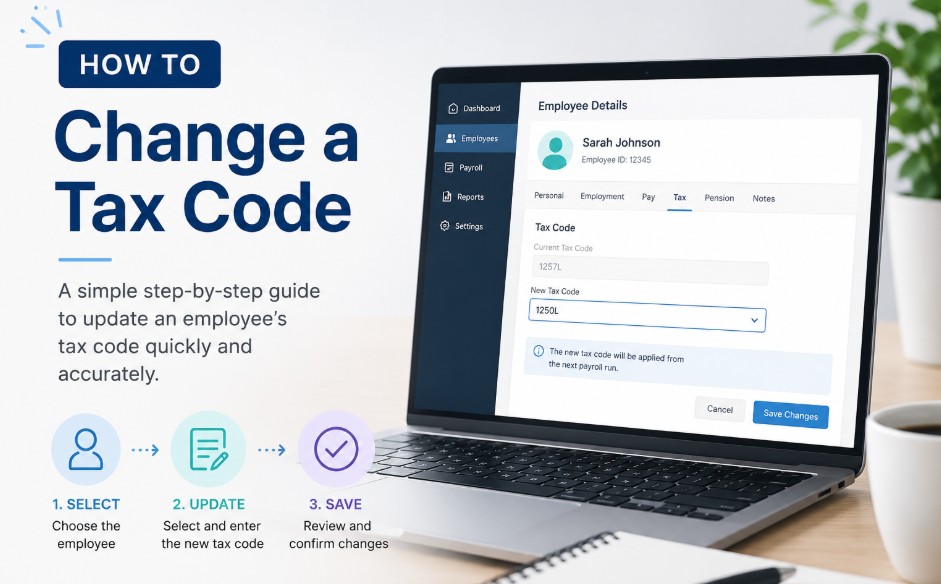
How to Change Tax Code: Step-by-Step UK Guide to HMRC Corrections
To change your tax code in the UK, you must report changes to your income, job status, or company benefits directly to His Majesty’s Revenue and Customs. HMRC will then issue a digital coding notice to your employer to automatically adjust your monthly Pay As You Earn payroll deductions.
Key Takeaway
- You can update your employment details and estimated income online through the official GOV.UK personal tax portal or the mobile application.
- The standard tax-free Personal Allowance for the 2026/2027 financial year is set at £12,570, which is represented by the 1257L alphanumeric code.
- Processing a tax code update typically takes between 5 and 10 working days for HMRC to review and transmit the revised notice to your employer.
- Employers cannot alter your tax code independently without a formal electronic notification or coding update transmitted directly from central HMRC systems.
What Is the Tax Code?
As of 2026, a UK tax code functions as a vital alphanumeric sequence utilized by employers and pension providers to calculate precise Income Tax deductions under the Pay As You Earn framework. Understanding this code ensures accurate monthly take-home pay and prevents unexpected financial adjustments at the end of the tax year.
- The Numbers: This portion represents your total tax-free Personal Allowance (the amount of income you can earn before you start paying tax) for the financial year, divided by ten. For example, a code starting with 1257 means you can earn £12,570 tax-free.
- The Letters: The alphabetical suffix acts as an instruction manual for payroll software. It tells the system how to treat that specific stream of revenue relative to national thresholds and your personal circumstances.
Why is tax code important?
Your tax code directly dictates how much money drops into your bank account every single month. Keeping a close eye on it ensures your employer deducts the correct amount of tax, preventing immediate underpayment penalties or long-term overpayment processing delays.
The Practical Risks of an Incorrect Code
- Preventing Overpayment: If you are placed on an incorrect emergency or basic rate code, your employer will deduct too much tax, leaving you with less money in your pocket during the month. While you will eventually get this back as a refund, it can take months for HMRC to process it automatically. Similar systemic discrepancies can also occur on your investment income; if you notice discrepancies in your investment brackets, Understanding and Resolving an HMRC Savings Tax Error can help you reclaim lost funds.
- Avoiding Tax Debts: If your tax code is accidentally too high, you will receive a larger paycheck now, but you will face a stressful surprise later. HMRC will issue a formal demand (a P800 calculation) to claw back the underpaid tax at the end of the fiscal period.

How to Change Tax Code?
To change your tax code, you must report income adjustments, job transitions, or lifestyle modifications directly to HMRC using digital government channels or telephone helplines.
Employers lack the legal authority to modify tax codes based on verbal requests or internal company records. They must receive an official electronic coding notice directly from HMRC before updating payroll software.
1. The Mandatory Corrective Pathway for PAYE Adjustments
Submitting your current financial information through digital government channels is the quickest method, removing postal delays and queuing your application directly into the automated system.
- Gather your documentation: Have your National Insurance number, your current employer’s PAYE reference, and your latest payslip details on hand.
- Log in to your portal: Access your Personal Tax Account on the official GOV.UK portal using your secure Government Gateway credentials, or open the official HMRC App on your smartphone.
- Navigate to PAYE: Go directly to the specific dashboard labelled Pay As You Earn (PAYE).
Select your update link: Click the operational link titled Check or update your benefits or Update your estimated income details. - Input dates and data: Enter the exact date your employment situation shifted (or when a company benefit ceased), alongside your corrected annual gross income estimation or the accurate valuation of your workplace perks.
- Submit and monitor: Review the compiled adjustment summary for factual accuracy, hit submit, and monitor your digital dashboard for the generation of a new P2 Coding Notice reflecting the updated values.
2. Offline Channels
If you cannot access digital services, or if your tax history is highly complex, you must contact HMRC directly to explain your situation.
- By Phone: You can call HMRC’s Income Tax helpline at 0300 200 3300 (Outside the UK: +44 135 535 9022). Ensure you have your National Insurance number and current payslip ready. Be prepared for potential hold times during peak morning or end-of-month hours.
- Through an Accountant: An accountant can advise you and contact HMRC on your behalf, but they can only legally submit these changes if they are formally registered as your authorised agent with HMRC using a signed 64-8 compliance form.
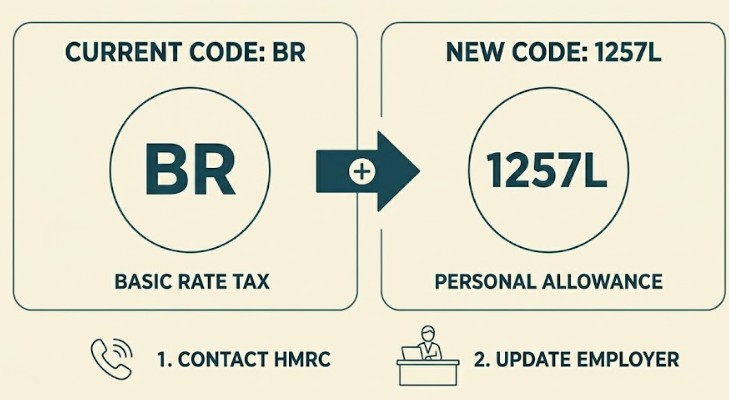
How to Change Tax Code from BR to 1257L for Primary Income?
To transition an income stream from a flat 20% Basic Rate (BR) designation back to the standard 1257L tax-free allowance, you must prove to HMRC that this specific job is your primary source of revenue.
Resolving New Job Emergency Code Allocations
This scenario frequently targets individuals whose previous employer delayed issuing a formal P45, causing the new employer’s software to automatically apply an emergency tax rate.
By updating your active employment configuration within the digital portal, you signal that your personal allowance should attach to this primary position rather than remaining split or unallocated.
Step-by-Step Processing Timeline
It typically takes HMRC between 5 and 10 working days to process a tax code change and transmit it to your employer. The adjusted take-home pay will then officially reflect on your payslip during your company’s next scheduled monthly payroll run.
| Stage in Correction Cycle | Operational Action | Expected Administrative Timeframe |
| Digital/Phone Submission | Taxpayer reports job status or benefit change to HMRC. | Instant logging upon submission. |
| P2 Coding Notice Issue | HMRC generates a physical or digital allowance statement for you. | Within 5 to 7 working days. |
| Employer P6 Notification | Payroll network receives a secure electronic code update from HMRC. | Within 10 working days. |
| Workplace Payroll Update | The updated code alters net take-home pay structures. | Next scheduled monthly payroll run. |
What Tax Code Should I Be On?
The standard baseline tax code for the current 2026/2027 financial year is 1257L, granting a default tax-free Personal Allowance of £12,570.
If your personal financial profile involves a single source of employment income without company vehicles, private medical insurance, or outstanding state benefit debts, this baseline code should appear on your monthly payslip.
Factors That Compress or Expand Your Personal Allowance
Your code deviates from the standard baseline whenever your total taxable compensation profile shifts. Receiving non-cash company perks, such as private medical insurance or a fuel card, reduces your cash allowance, resulting in an adjusted code lower than 1257L.
Additionally, if you are an entrepreneur or company director restructuring your enterprise, you may qualify for specific reliefs like Business Asset Disposal Relief to manage your tax liabilities efficiently.
Conversely, claiming flat-rate job expenses, making gross personal pension contributions, or utilising the Marriage Allowance transfer will expand your tax-free threshold, prompting HMRC to issue a modified suffix.
Why There Is No Definitive Best Tax Code?
A frequent point of consumer confusion is the search for what’s the best tax code to maximise monthly take-home pay.
Mechanically, there is no premium or best code configuration within HMRC parameters. The optimal tax code is simply the one that accurately matches your live cumulative financial layout.
An artificially high allowance code will boost short-term monthly cash flow but inevitably creates an underpayment balance, triggering a formal demand for unpaid tax at the end of the fiscal period.
What do the different tax code letters mean?
HMRC uses different letter configurations to handle varying financial layouts and instruct payroll systems on how to tax your income. The letters signify whether you have a standard personal allowance, a secondary job taxed at a flat rate, or untaxed benefits that exceed your allowance.
Standard Configurations
| Tax Code | Operational Meaning | Core Tax Practical Application |
| 1257L | Standard Personal Allowance | Applies to a single job or primary pension source with no untaxed fringe benefits. |
| BR | Basic Rate (Flat 20%) | Used for secondary jobs or supplementary pensions where no personal allowance remains. |
| D0 | Higher Rate (Flat 40%) | Applied automatically to secondary income if total earnings cross higher thresholds. |
| D1 | Additional Rate (Flat 45%) | Reserved for high earners whose supplementary income sits within top tax brackets. |
| NT | No Tax | Applied when income is entirely exempt from UK Income Tax deductions. |
Special Status Codes
- K Codes: A K prefix (e.g., K450) occurs when your untaxed income or company benefits exceed your total personal allowance. Essentially, it turns your tax-free threshold into a taxable debt collected monthly.
- M & N Codes: M indicates you have received a 10% transfer of your partner’s Personal Allowance (Marriage Allowance). N indicates you are the partner who transferred your allowance.
- T Codes: Used if HMRC needs to review your items manually, or if your allowance must be tailored to include other calculations, such as high-income scaling.
How do I find my current tax code?
An individual can locate their active tax code by inspecting their physical or electronic monthly payslip, or by logging into the secure HMRC digital portal. Checking these documents regularly ensures your employer’s payroll data matches central government records.
Physical & Employer Documents
- Your Monthly Payslip: Typically positioned near your National Insurance number or the payroll identifier block.
- Form P60: The annual tax summary issued by your employer at the close of every tax year (April).
- Form P45: The document provided by your HR department when exiting an organisation.
Digital Verification Platforms
For a real-time, live look at your tax status, you can log into the secure HMRC tax code checker utility inside the official GOV.UK personal portal or the official HMRC smartphone app.
This digital dashboard displays your active code, details exactly how the numerical value was calculated, and lists any company benefits currently deducted from your personal allowance.
Why Should I want to change my Tax Code?
You should want to change your tax code whenever your total taxable compensation profile shifts, such as changing jobs, receiving new company perks, or claiming professional expenses. Promptly reporting these changes ensures you do not accidentally overpay tax or accumulate state debt.
Common Triggers for a Coding Review
- Company Perks (Compensates Allowance): Receiving non-cash company perks, such as private medical insurance, a company car, or a fuel card, reduces your cash allowance, resulting in an adjusted code lower than 1257L.
- Job Expenses & Benefits (Expands Allowance): Claiming flat-rate job expenses (like uniforms or professional fees), making gross personal pension contributions, or utilising the Marriage Allowance transfer will expand your tax-free threshold, giving you a higher number or different suffix.
- Job Shifting / Emergency Tax: A common pattern among workers shifting occupations is a temporary misallocation of their allowance. If a previous employer delays issuing a formal P45, a new employer’s software may automatically apply an emergency code (like BR or 1257 W1/M1), causing unnecessary tax deductions.
Who Can Change the Tax Code on a Company Payroll?
Only designated officers at His Majesty’s Revenue and Customs (HMRC) hold the absolute legal authority to issue, modify, or cancel a PAYE tax code.
Employers, human resource representatives, and outsourced corporate payroll companies are legally powerless to alter an employee’s tax code based on internal assessments or direct worker requests.
Balance of Responsibilities
- HMRC Authority: Possesses exclusive regulatory control over coding notice distributions.
- Employer Obligations: Must comply exactly with official P6 or P9 electronic parameters.
- Individual Responsibility: Obligated to report personal income adjustments to trigger a review.
A payroll clerk cannot change the tax code to resolve a dispute; they must continue applying the current code until HMRC transmits an updated directive.
Conclusion
Maintaining an accurate tax code protects your monthly earnings from unnecessary deductions and prevents sudden year-end tax bills.
Review your digital tax account regularly, report changes to your employment or benefits promptly, and monitor your upcoming payslips to confirm that official HMRC notices have been successfully applied by your payroll department.
FAQ
Where do I change my tax code?
You can change your tax code online by logging into your Personal Tax Account on the official GOV.UK portal or by using the official HMRC mobile app. Alternatively, you can contact the HMRC Income Tax helpline directly by phone to report your updates.
What is the most common tax code?
The most common tax code is 1257L. This code applies to the vast majority of UK workers who have a single job or pension source and receive the standard tax-free Personal Allowance without any adjustments for company benefits or unpaid tax debts.
How to claim higher rate tax relief on pension?
Higher rate taxpayers can claim additional tax relief on personal pension contributions by contacting HMRC directly via phone or digital post, or by including the pension payments in an annual Self Assessment tax return to extend their tax-free band.
Who is eligible for a UK tax refund?
You are eligible for a UK tax refund if you have overpaid Income Tax during the financial year. This frequently happens when individuals are placed on an emergency tax code, leave employment mid-year, or experience a drop in annual taxable income.
What is an emergency tax code?
An emergency tax code is a temporary code applied by employers when HMRC lacks sufficient employment history. Common examples include codes ending in W1, M1, or X, which tax earnings on a week-one or month-one basis without rolling over allowances.