How to Find HMRC VAT Bank Details and Pay Your Bill Correctly: An SME Guide
HMRC VAT bank details refer to the official sort codes, account numbers, and international IBAN/BIC codes issued by HM Revenue and Customs for UK small- and medium-sized enterprises (SMEs) to settle quarterly tax liabilities or handle corporate remittances securely via electronic bank transfers, Faster Payments, or CHAPS.
Small business directors and finance managers must use verified government banking instructions and reference guides such as HMRC tax bank accounts to avoid misallocated funds, compliance audits, and cash flow disruption.
- Corporate VAT payments must go directly to HM Revenue Bank using sort code 08-32-00 and account number 11963155.
- The mandatory 18-digit VAT payment reference must be entered without spaces to prevent unallocated funds.
- Faster Payments clear within hours, whereas standard Bacs transfers require a mandatory three-working-day lead time.
- Securely update repayment bank details via the online Business Tax Account to prevent postal delays and interception.
How to Find HMRC VAT Bank Details?
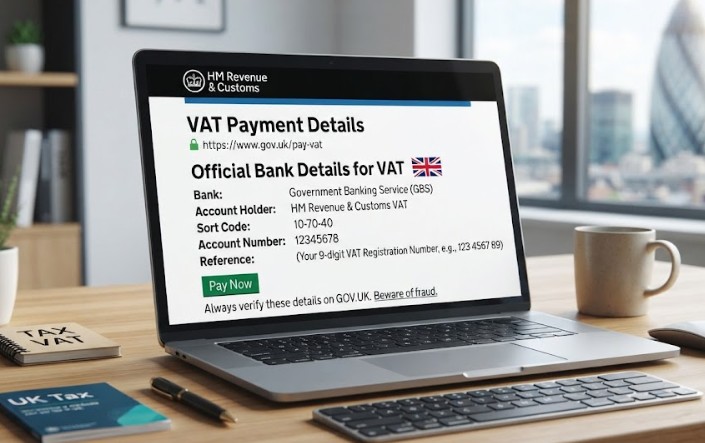
To find official HMRC VAT bank details, log in to your GOV.UK Business Tax Account and navigate to your VAT section. For standard UK payments, use sort code 08-32-00 and account number 11963155 with your 9-digit VAT reference.
For international transfers, use IBAN GB36 BARC 2005 1773 1523 91 and BIC BARCGB22.
- Log in to your Business Tax Account on GOV.UK. This is the single source of truth for HMRC’s current bank details. Go to gov.uk and sign in with your Government Gateway ID rather than following a link from an email.
- Open the VAT section of your account. Select View your VAT account, then select the option to make a payment. HMRC displays its official sort code, account number, and payment reference for your business here.
- Cross-check the details against what you’re about to pay. Compare the sort code (08-32-00) and account number (11963155) shown in your account against whatever instructions you’ve been given, from an invoice, an accountant, or a template like this one.
- Confirm the beneficiary name reads HMRC VAT. If your banking app shows a different name, stop and don’t proceed with the transfer.
- Note your specific payment reference before leaving the page. This is unique to your business and return period, so copy it directly from your account rather than reusing a previous quarter’s reference.
What Are the Official HMRC VAT Bank Details and Reference Codes?
HMRC operates distinct routing paths depending on whether corporate funds originate from domestic UK clearings or international accounts requiring structural cross-border identifiers.
| Payment Method | Account Structure / Sort Code | Processing Window | Reference Requirement |
| Faster Payments | Sort Code: 08-32-00, Account: 11963155 | Same day / within 2 hours | 9-digit or 18-digit VAT reference |
| CHAPS | Sort Code: 08-32-00, Account: 11963155 | Same working day (if cut-off met) | 9-digit or 18-digit VAT reference |
| Bacs | Sort Code: 08-32-00, Account: 11963155 | 3 working days | 9-digit or 18-digit VAT reference |
| Overseas Transfer | IBAN: GB36 BARC 2005 1773 1523 91, BIC: BARCGB22 | 3 to 5 working days | VAT registration number (no spaces) |
Overseas entities trading within the UK market must use the designated International Bank Account Number and Business Identifier Code listed above, prefixing the transaction with the exact corporate VAT registration number without internal whitespace.
Where Can I Find My VAT Payment Reference Number?
The correct payment reference, typically a 9-digit VAT registration number or an extended 18-digit format, can be found on the corporate VAT online account portal or physical VAT registration certificate.
- Inside the digital Business Tax Account dashboard under the active VAT service tab.
- Printed on historical VAT return confirmation emails and official HMRC correspondence letters.
- Listed directly on the primary VAT registration certificate issued at business inception, which can also be verified during on boarding or vendor checks through a standard VAT Number Check by Company Name.
Entering an incorrect reference number is the leading cause of unallocated payments, where funds leave the corporate account but remain unassigned against the company’s tax ledger.
How Do I Make a VAT Payment to HMRC by Bank Transfer?
Business owners can transfer funds directly from a corporate bank account via online banking, mobile apps, or banking portals using Faster Payments, CHAPS, or Bacs.
- Log in to the corporate business bank account and navigate to domestic or international transfers.
- Input HMRC’s exact sort code (08-32-00) and account number (11963155).
- Enter the mandatory 18-digit VAT payment reference number without spaces.
- Verify the exact beneficiary name displays as HMRC VAT or HM Revenue and Customs.
- Input the exact liability sum matching the submitted digital tax return.
- Authorise the payment and save the electronic confirmation receipt for corporate records.
Paying by phone: Corporate entities can also settle tax bills via telephone banking or automated telephone services by contacting their corporate bank and providing HMRC’s standard sort code and account number.
This is a useful backup when online portals experience scheduled maintenance or authentication failures; just make sure to initiate the call well ahead of the filing deadline to allow for holding times and clearing intervals, and retain the transaction reference for reconciliation.
Which HMRC Account Do I Pay VAT To?
Small businesses must remit VAT liabilities exclusively to the official HM Revenue and Customs Government Banking Service accounts, using designated sort codes and account numbers rather than generic commercial tax office details.
In practice, UK domestic business transfers route through sort code 08-32-00 and account number 11963155 under the account name HMRC VAT. Business owners should avoid relying on unverified third-party templates or outdated accounting software directories when executing tax transfers.
When reviewing decisions regarding corporate tax compliance, relying on official government registries remains the single most effective safeguard against administrative penalties.
HMRC operates dedicated banking channels to process high-volume SME transactions safely. Using incorrect sort codes or legacy bank accounts leads directly to rejected transactions, manual intervention delays, and potential default surcharges.
What are the HMRC Processing Times?
HMRC accepts payments on the exact date funds clear or are authorized, but processing windows vary dramatically depending on whether Faster Payments, CHAPS, or Bacs systems are deployed.
Faster Payments execute within hours, while Bacs requires a mandatory three-day lead time that can trigger penalties if initiated on the statutory deadline.
As of 2026, automated banking networks process Faster Payments around the clock, but weekend processing anomalies can still affect bank settlement dates. Finance directors must account for banking holiday schedules when scheduling electronic tax disbursements.
How to Avoid HMRC Payment Scams?
Fake HMRC bank details are a common phishing tactic, and SMEs are a frequent target because a single misdirected VAT payment can be a large sum. A few habits protect your business:
- Only use sort code and account details from GOV.UK or your Business Tax Account, never from an emailed invoice, text message, or unsolicited phone call, even if it looks official.
- HMRC will never ask you to change its bank details by email or SMS. Any message claiming otherwise is a scam; do not act on it, and report it to HMRC’s phishing team.
- Double-check that the beneficiary name shows as HMRC VAT before authorising; a mismatched name is a red flag, even if the sort code looks right.
- Be wary of urgency tactics; scam messages often threaten immediate penalties or account freezes to pressure a rushed transfer.
- Verify agent or accountant instructions independently if someone claiming to act on HMRC’s behalf asks you to pay a new account.
How Do Delays or Mis-Payments of VAT Affect SMEs?
Misallocated payments or missed deadlines directly trigger HMRC default surcharges, compounding interest penalties, potential compliance investigations, and severe strain on corporate working capital, administrative burdens that lead some overwhelmed founders to wonder if being VAT registered is killing my business.
- Unallocated funds leaving company bank accounts while HMRC flags the return as unpaid, creating administrative overhead.
- Cash flow pressure resulting from penalty charges, default interest accruals, and unexpected debt collection notices.
- Potential escalation to formal debt enforcement agencies if communication breakdowns persist across tax quarters.
A common pattern is that small business owners discover payment allocation errors only weeks later when receiving automated penalty notices from tax authorities.
How to Give HMRC Your Bank Details for VAT Repayments Safely?
Registered enterprises must securely submit or modify repayment bank details directly through their online Business Tax Account to ensure net-repayment refunds are deposited without postal or manual check delays.
Directors can navigate the Government Gateway security portal, verify company bank account names against registered trading entities, and prevent interception fraud.
Submitting accurate business bank account credentials ensures that net VAT reclaims route directly to corporate operating accounts without triggering manual fraud verification holds by HMRC security teams.
Conclusion
Managing HMRC VAT bank details efficiently protects small businesses from costly processing errors and cash flow disruptions.
Finance managers should verify sort code 08-32-00, account number 11963155, and the 18-digit payment reference before authorising any electronic transfer.
Reviewing digital tax accounts regularly ensures repayment details remain current and compliant with UK tax regulations.
Disclaimer: This guide is for informational purposes only and does not constitute formal financial or legal advice; always verify banking instructions directly through official GOV.UK channels.
FAQ
Can I pay my corporate VAT bill using a personal bank account?
Only sole traders may use a personal account; limited companies must pay exclusively from verified corporate business accounts matching official company registration details.
What happens if I forget to include my VAT reference number on a bank transfer?
Unreferenced funds sit in HMRC suspense accounts, requiring you to contact the VAT helpline with proof of payment to reallocate the remittance.
Do PAYE or Corporation Tax use the same bank details as VAT?
No, HMRC uses entirely separate accounts and references for each tax regime, so never reuse VAT bank details for other tax payments.
Can I set up a Direct Debit for automated HMRC VAT collections?
Yes, you can establish a variable Direct Debit through your Business Tax Account, letting HMRC automatically collect the correct amount on the filing due date.
Are international wire transfers subject to currency conversion fees when paying HMRC?
Yes, HMRC accounts only accept British Pounds Sterling, so overseas businesses must settle conversion rates through their sending bank first.